Blog Archives
1 … 7 8 9 10 11 12 13 14 15 … 18

Dozer bean mapping tutorial

Dozer is a framework that maps fields from source bean to target bean.

Practical scenarios to map source bean to target bean?

1) Applications A and B might be having different contracts and objects need to be converted from A to B. For example, Mapping JAXB Objects to Business/Domain Objects.

…

Read more ›


Dozer with Spring & Maven Tutorial

This tutorial compliments Basic Dozer Tutorial by adding Spring.

Step 1: Create a simple Maven project from a command-line. Just press enter for all the prompts.

Step 2: Import the above “simple-dozer” folder in the file system into eclipse.

…

Read more ›


Eclipse IDE tutorial diagnosis and tips for the beginners

This assumes that you have gone through “Setting up Java, Maven, and Eclipse”

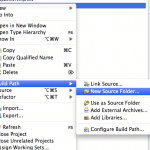
#1. Creating the source folder like src/main/java, src/main/resource, etc via eclipse IDE

To create a new source folder under src/main/, right mouse click on project say “simple”.

eclipse-diagnosis-tut-1

eclipse-diagnosis-tut-2
click on finish.

…

Read more ›


Exposing a Java class as a MXBean (or MBean) tutorial with jconsole

You can take a Java POJO (i.e. Plain Old Java Object) and expose it as an MBean, and view or modify values via JMX. In this tutorial, we will use jconsole, which is a JMX client. Step 1: Create a new Maven based Java project.

Step 2: Import it...

This content is for 30-Day-Full-Access, 100-Day-Full-Access, 200-Day-Full-Access, and 365-Day-Full-Access members only. Register 80+ Free Java FAQs 80+ Free Big Data FAQs
Already a member? Log in here


Findbugs and Maven tutorial

Findbugs is an open source project for a static analysis of the Java bytecode to identify potential software bugs.

Findbugs-structure

Step 1: The pom.xml with the findbug & site reporting plugins and properties.

Step 2: Exclude certain classes with an exclude filter

src/main/resources/findbugs/excludeFilter.xml

Step 3: Running mvn command to spot bugs

Step 4: Running mvn command to report bugs

this creates the file “findbugs.html”

…

Read more ›


Finding your way around the FIX specification Q&A

Firstly, decide on the specification version. If you are using FIX spec 4.4 then go to https://fixspec.com/FIX44. The tutorials with QuickFIX/J used NewSingleOrder as the request. The message has the fields like Tag number. … Read more ›...

This content is for 30-Day-Full-Access, 100-Day-Full-Access, 200-Day-Full-Access, and 365-Day-Full-Access members only. Register 80+ Free Java FAQs 80+ Free Big Data FAQs
Already a member? Log in here


FIX and Java tutorial with QuickFIXj

QuickFixJ is a FIX (Financial Information eXchange) engine for Java. Handy to have knowledge on FIX protocol if you aspire to work for investment banks and other financial services companies. FIX router and FIX engines are depicted below. Step 1: Create a new Maven based Java project. … Read more...

This content is for 30-Day-Full-Access, 100-Day-Full-Access, 200-Day-Full-Access, and 365-Day-Full-Access members only. Register 80+ Free Java FAQs 80+ Free Big Data FAQs
Already a member? Log in here


Groovy console for beginner and meta programming

This assumes that you have setup groovy as per Setting up Groovy and groovysh beginner for eval exp, dynamic typing, operator overloading & closure.

Step 1: Start the groovyConsole from a command prompt

Step 2: Run the following Groovy Plain Old Object code

Execute it as a Groovy script.

…

Read more ›


groovysh beginner for eval exp, dynamic typing, operator overloading & closure

This assumes that you have setup groovy as per Setting up Groovy.

#1: Running groovysh

You can now type your expressions on the “groovy:000>” prompt like

Q1.

…

Read more ›


Handy DOS commands for Java developers

Q. How will you copy files more robustly in DOS?
A. Using the Robocopy (stands for Robust File Copy) or Xcopy command line utilities. Check for its options with “robocopy /?“.

Q.

…

Read more ›


Hibernate Query Language (HQL) tutorial

Step 1: The ER diagram showing the relationships among the tables. The column names and types are omitted to keep it simple. Step 2: The basic table details. The UserApp table uses “UserName” … Read more ›...

This content is for 30-Day-Full-Access, 100-Day-Full-Access, 200-Day-Full-Access, and 365-Day-Full-Access members only. Register 80+ Free Java FAQs 80+ Free Big Data FAQs
Already a member? Log in here


Hibernate tutorial with HSQLDB

This tutorial is basically an extension to the “Setting up” Java” and “JDBC tutorials”. Hibernate is an ORM (Object to Relational Mapping) tool. Step 1:  First step is to bring in the relevant Hibernate framework jar files like hibernate-xxx.jar, hibernate-annotations-xxxx.jar, … Read more ›...

This content is for 30-Day-Full-Access, 100-Day-Full-Access, 200-Day-Full-Access, and 365-Day-Full-Access members only. Register 80+ Free Java FAQs 80+ Free Big Data FAQs
Already a member? Log in here


Invoking a Pentaho DI (i.e. Kettle) transformation from Java

Step 1: Assumes that you have gone through the Part-1: Pentaho with user defined Java transformer tutorial. In this tutorial, we will execute the ETL transformation created via Kettle in Part-1. Step 2: The “pom.xml” file to include Pentaho Data Integration (i.e. … Read more ›...

This content is for 30-Day-Full-Access, 100-Day-Full-Access, 200-Day-Full-Access, and 365-Day-Full-Access members only. Register 80+ Free Java FAQs 80+ Free Big Data FAQs
Already a member? Log in here


1 … 7 8 9 10 11 12 13 14 15 … 18

300+ Java Interview Questions - FAQs

Tutorials on Java & Big Data