Related Links 1. Spring MVC RESTful with JPA, Hibernate & MySQL database beginner step by step. … Read more ›...
800+ Java & Big Data Interview Q&As
130+ job offers to choose from as a self-taught Java & Big Data contractor for 22+ years. It pays to prepare.
Blog Archives
04a: ⏯ Spring MVC with Thymeleaf beginner video tutorial
Related Links 1. Spring MVC with Thymeleaf and JavaConfigs. … Read more ›...
05: Akka tutorial in Java – calculating the factorials concurrently
This tutorial extends the previous tutorial Simple Akka tutorial in Java step by step. This is a non trivial example of calculating the factorial for a range of numbers in parallel. Step 1: The main class “FactorialCalculatorMain.java” takes a range: start and end as input arguments, … Read more ›...
05: Docker Tutorial – Client & Server on separate containers & networking

In this tutorial, let’s run a Java socket client & a server in two separate Docker containers. Both the client & server are continuously run, and networked by creating a Docker network. MyClient.java
|
1 2 3 4 5 6 7 8 9 10 11 12 13 14 15 16 17 18 19 20 21 22 23 24 25 26 27 28 29 30 31 32 33 34 35 |
package com.myapp; import java.io.IOException; import java.io.OutputStream; import java.io.PrintWriter; import java.net.Socket; import java.util.Scanner; public class MyClient { public static void main(String[] args) throws IOException { if (args.length != 1) { System.err .println("Pass the server IP as the sole command line argument"); return; } try (Socket socket = new Socket(args[0], 8888); Scanner sc = new Scanner(System.in); Scanner in = new Scanner(socket.getInputStream())) { OutputStream os = socket.getOutputStream(); PrintWriter out = new PrintWriter(os); while (true) { while(sc.hasNextLine()) { String msg = sc.nextLine(); System.out.println("Client sending: " + msg); out.println(msg); out.flush(); System.out.println("Server response: " + in.nextLine()); } } } } } |
MyServer.java
|
1 2 3 4 5 6 7 8 9 10 11 12 13 14 15 16 17 18 19 20 21 22 23 24 25 26 27 28 29 |
package com.myapp; import java.io.IOException; import java.io.PrintWriter; import java.net.ServerSocket; import java.net.Socket; import java.util.Scanner; public class MyServer { public static void main(String[] args) throws IOException { try (ServerSocket listener = new ServerSocket(8888)) { System.out.println("The server is running..."); while (true) { try (Socket socket = listener.accept(); Scanner in = new Scanner(socket.getInputStream())) { PrintWriter out = new PrintWriter(socket.getOutputStream(), true); while (in.hasNextLine()) { String msg = in.nextLine(); System.out.println("Server received: " + msg); out.println(msg.toUpperCase()); } } } } } } |
Dockerfile.client
|
1 2 3 4 5 6 7 8 9 10 11 12 13 14 15 16 17 18 19 20 21 22 |
FROM alpine:3.6 MAINTAINER java-success.com WORKDIR /app USER root # install required packages RUN apk add --no-cache openssh openssl openjdk8 rsync bash procps nss maven # set JAVA_HOME ENV JAVA_HOME /usr/lib/jvm/java-1.8-openjdk ENV PATH $PATH:$JAVA_HOME/bin COPY src/main/java/com/myapp/MyClient.java com/myapp/MyClient.java RUN javac com/myapp/MyClient.java EXPOSE 8888 ENTRYPOINT ["java"] CMD ["com.myapp.MyClient", "myserver"] |
Note that “ … Read more ›...
05: Drools with rules in an excel spreadsheet – Global variables & variable capture

This extends 04: Drools with rules in an excel spreadsheet – Data validation .
Step 1: Enhance the Trade.java POJO with “actualValues” field and “getFieldValue(String fieldNames)” method.
|
1 2 3 4 5 6 7 8 9 10 11 12 13 14 15 16 17 18 19 20 21 22 23 24 25 26 27 28 29 30 31 32 33 34 35 36 37 38 39 40 41 42 43 44 45 46 47 48 49 50 51 52 53 54 55 56 57 58 59 60 61 62 63 64 65 66 67 68 69 70 71 72 73 74 75 76 77 78 79 80 81 82 83 84 85 86 87 88 89 90 91 92 93 94 95 96 97 98 99 100 101 102 103 104 105 106 107 108 109 110 111 112 113 114 115 116 117 118 119 120 121 122 123 124 125 126 127 128 129 130 131 132 133 134 135 |
package com.mytutorial.pojo; import java.lang.reflect.Field; import org.apache.commons.lang.StringUtils; public class Trade { private String tradeId; private String tradeDate; private String symbol; private String price; private String volume; private String totalPrice; private String buyerId; private String sellerId; private String actualValues; public Trade(String tradeId, String tradeDate, String symbol, String price, String volume, String totalPrice, String buyerId, String sellerId) { super(); this.tradeId = tradeId; this.tradeDate = tradeDate; this.symbol = symbol; this.price = price; this.volume = volume; this.totalPrice = totalPrice; this.buyerId = buyerId; this.sellerId = sellerId; } public String getTradeId() { return tradeId; } public void setTradeId(String tradeId) { this.tradeId = tradeId; } public String getTradeDate() { return tradeDate; } public void setTradeDate(String tradeDate) { this.tradeDate = tradeDate; } public String getSymbol() { return symbol; } public void setSymbol(String symbol) { this.symbol = symbol; } public String getPrice() { return price; } public void setPrice(String price) { this.price = price; } public String getVolume() { return volume; } public void setVolume(String volume) { this.volume = volume; } public String getTotalPrice() { return totalPrice; } public void setTotalPrice(String totalPrice) { this.totalPrice = totalPrice; } public String getBuyerId() { return buyerId; } public void setBuyerId(String buyerId) { this.buyerId = buyerId; } public String getSellerId() { return sellerId; } public void setSellerId(String sellerId) { this.sellerId = sellerId; } public String getActualValues() { return actualValues; } public void setActualValues(String actualValues) { this.actualValues = actualValues; } //reflection to get field values public String getFieldValue(String fieldNames) throws NoSuchFieldException, SecurityException, IllegalArgumentException, IllegalAccessException { if (StringUtils.isEmpty(fieldNames)) { throw new IllegalArgumentException(); } String[] splits = fieldNames.split("\\,"); StringBuilder sb = new StringBuilder(); for (int i = 0; i < splits.length; i++) { Field field = this.getClass().getDeclaredField(splits[i].trim()); field.setAccessible(true); sb.append((String) field.get(this)); if (i < splits.length - 1) { sb.append("|"); } } return sb.toString(); } @Override public String toString() { return "Trade [tradeId=" + tradeId + ", tradeDate=" + tradeDate + ", symbol=" + symbol + ", price=" + price + ", volume=" + volume + ", totalPrice=" + totalPrice + ", buyerId=" + buyerId + ", sellerId=" + sellerId + ", actualValues=" + actualValues + "]"; } } |
Step 2: trades-rules.xls with “
…
05: Kubernetes useful commands with kubectl for development & debugging
This extends Install Kubernetes (i.e. minikube) on Mac.
Step 1: Start the Docker.app on Mac, and then start the minikube cluster from a terminal.
|
1 2 3 |
~]$ minikube start |
Step 2: Create a pod.yaml manifest file to create a new pod that runs nginx image.
…
05. Spring Cloud routing with Netflix’s Zuul

Q. What is Netflix’s Zuul usecase in Micro Services Architecture? A. In a typical micro service architecture you have many micro services running on different hosts and ports. The challenge with this type of architecture is how different clients like browser based Web Applications, Mobile based apps, … Read more...
05.Getting started with Eclipse IDE & Maven step by step tutorial
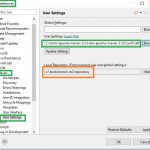
In the tutorial “Setting up Eclipse IDE step by step tutorial” we looked at installing Eclipse IDE, importing an existing Java project folder into eclipse, and creating a Java project within Eclipse. Industrial strength Java applications will be using Eclipse with Maven.
Configure Eclipse to work with Maven
We have already have a modified “settings.xml”
…
05a: ⏯ Spring 4 MVC RESTful Web Service Video Tutorial
Related Links
1. Spring 4 MVC RESTful Web Service Beginner Tutorial step by step.
RESTful Web Services Interview Q&As
50+ Java Web Services Interview Q&As with diagrams
…
05a: ⏯ Spring MVC web app with JPA, Hibernate & MySQL video tutorial
Related Link 1. Spring MVC Web Application with JPA, Hibernate & MySQL step by step. … Read more ›...
05E. Explain Java and Maven set up via Q&As
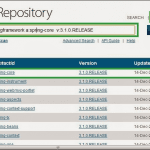
This is an extension posts outlining setting up & getting started with Java & Maven.
Q1. What is the difference between JDK & JRE?
A1. JDK: You can download a copy of the Java Development Kit (JDK) for your operating system like Windows 64 bit,
…
06: Capture throughput & latencies with “Metrics Core” tutorial
“Metrics Core” is a very handy framework to gather insights & tune performance of high-throughput and low-latency services. Here is a very simple core Java multi-threaded application that gathers metrics with this library. Step 1: Create a maven project Press enter for all prompts to use the default values. …...
Top